If you’re an event planner or thinking of transitioning into that industry, being organized is crucial to your success in planning events. If you’re already an organizational junkie, you probably naturally gravitated towards events. If being organized isn’t your bag, I have some tips that help me stay on top of everything when producing events.
Tip #1: Make Lists + More Lists

To successfully execute and plan an event, you will have many tasks and subtasks to complete, as well as delegate to other team members, in order to make the event happen. Creating lists are crucial to staying on top of all your tasks.
There’s a lot of ways you can create and manage lists, and it will ultimately depend on your preference. I use Trello and create a Board for each event I am working on. Within each Board, you can create different task buckets (ie – hotel management, food & beverage, AV, etc), then create subtasks within those buckets. You can add deadlines and assign other teammates to tasks. It’s very easy to use and really handy to help you stay on track of everything.

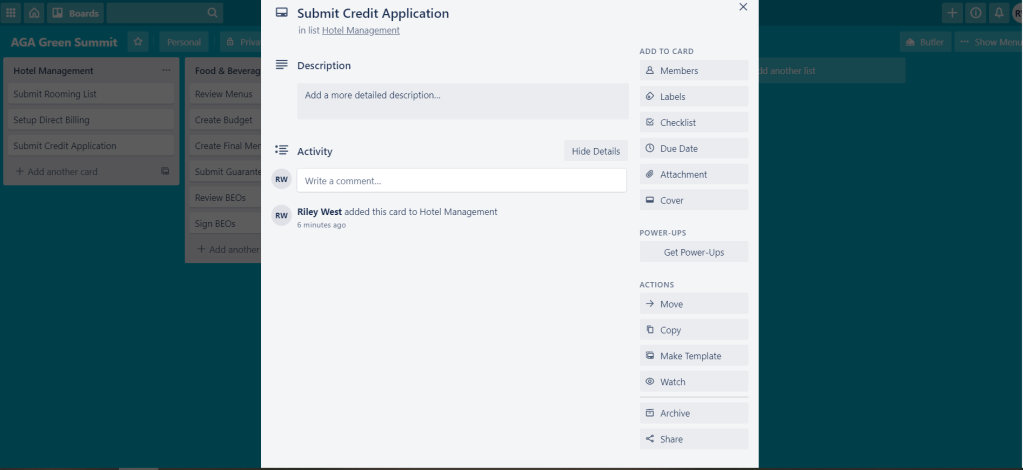
There are many other task management programs out there you can explore. You just have to figure out what’s best for you!
My tasks in Trello provide a project overview of all the tasks I need to complete for an event. In addition to that, I create daily hand-written to-do lists with tasks I’m trying to accomplish that day. I cross off whatever I complete. If I was not able to complete a task, I will add it to my new task list for the next day. I find it helpful to create my task list the day before, as it eases my anxiety.
Tip #2: Create Calendar Events for Important Deadlines
With event planning comes lots of deliverables and deadlines. I have a master timeline I create in Excel, but since that is a very high level overview, it’s helpful to create reminders of upcoming deadlines. Whether it’s submitting guarantees or creating copy for a registration page, I like to create calendar appointments with the deadline 1-2 days before it’s due (depending on the task). This helps remind me when something is coming up and needs to be completed or submitted.
Some of my colleagues also email themselves tasks that sit in their inboxes and helps them remember.
As a general rule, I review my master timeline once a week to make sure I’ve calendared all important upcoming deadlines.
Tip #3: Keep an Organized Inbox
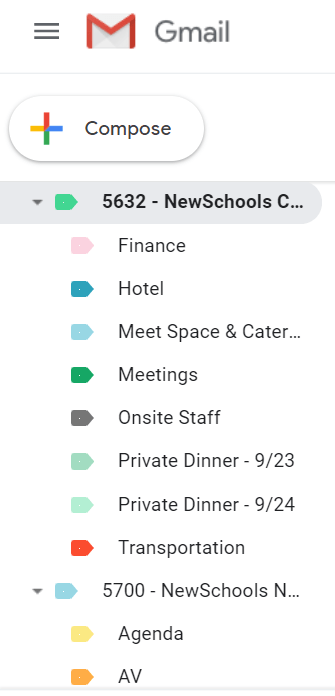
Event planners regularly get flooded with emails. Whether it’s from clients, teammates, or vendors, it can be a lot to sift through. I highly recommend creating folders in your email and not just having everything sit in your inbox. I like to organize folders by program, then create bucket subfolders (ie – hotel management, entertainment, food & beverage, AV, transportation, etc). It is a life saver when you’re managing multiple events at one time and have emails coming from various sources.
Tip #4: Update Shared Folders
In general I recommend keeping all of your files for an event in one specific folder. This will help you keep track of everything for your event. Again, creating subfolders within the main program folder is in important in staying organized. This is particularly crucial when you’re document sharing with a team. The more organized and updated you can be in your documentation, the more seamless it will be for your teammates to locate the documents they need and know where the latest and greatest lives.
 Riley D West